HTTP Caching
December 20, 2020
When we build websites we want them to load fast. One of the best ways is to use caching.
Caching is just keeping a copy closer to the user so you don’t have to get it from someplace farther away. HTTP cache is part of HTTP specs. It gives us a way to keep a copy of the response in the user browser’s memory.
So let’s start talking about what HTTP caching is.
What is HTTP Caching?
Let’s say user visits “https://example.com/docs”. Here’s what happens:
- Browser
- Sends request
- Server
- Receives the request
- Renders the page into HTML
- Send a response with the HTML in the body and a status code of 200
- Browser
- Downloads the body of the response
- Browser renders the page
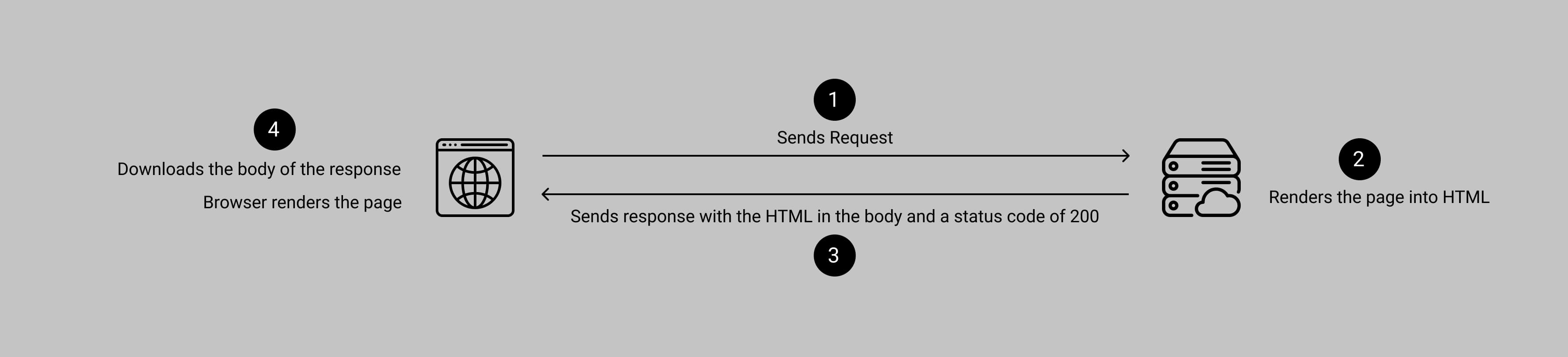
The next time user visits the page all of that has to happen all over again unless the server sends some specific header that tells the browser to cache it: “Cache-Control”.
That’s right, your browser already knows how to cache responses so it doesn’t have to download them more than once.
So if your server was sending a response like this:
return response(body, {
  headers: {
    "Content-Type": "text/html"
  }
})
You just add the Cache Control header:
return response(body, {
  headers: {
    "Content-Type": "text/html",
    "Cache-Control": "max-age=0, must-revalidate",
    "Etag": md5(body)
  }
})
These two lines change quite a bit for the user when he next visits the page. Let’s check it out.
Request with Caching
Here’s what happens when visiting the page for the first time.
- Browser
- Sends request
- Server
- Receives the request
- Renders the page into HTML
- Send a response with the HTML in the body and a status code of 200
- Sends “Cache-Control” and “Etag” headers
- Browser
- Downloads the body of the response
- Browser renders the page
- Browser caches the page on disk or in memory
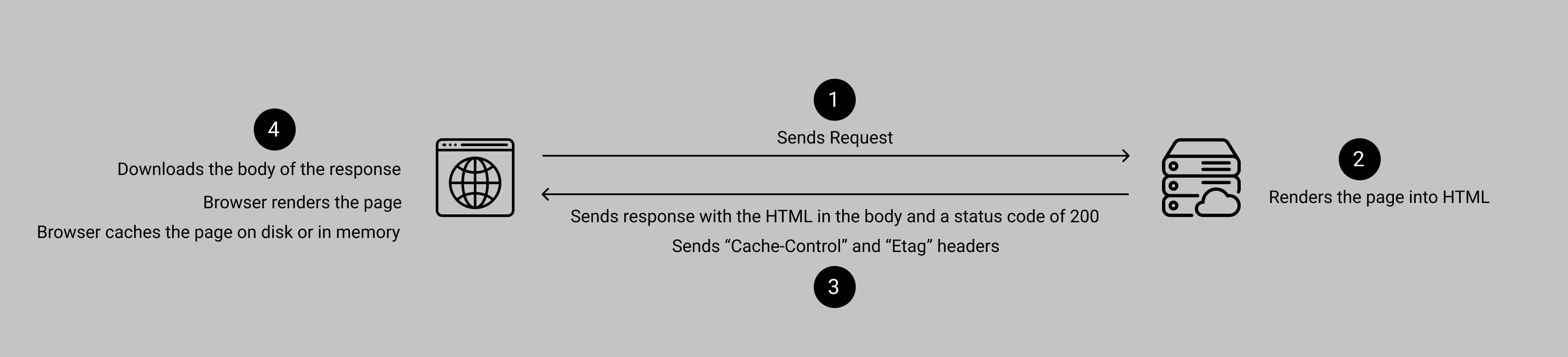
Now here’s what happens when the user visits the page second time.
- Browser
- Sends request
- Also sends request header If-None-Match with the Etag from last request
- Sends request
- Server
- Receives the request
- Renders the page into HTML
- Compares the Etag headers to its new Etag
- Etag matches, sends an empty response and a status code of 304
- Browser
- Sees 304, downloads nothing, reads from cache
- Renders the page

So how is this faster? As the browser doesn’t have to download the page again. You will also notice, that our server still had to generate the content to compare the Etag to know if it could send a 304 or not.
Now let’s see how can we fix this.
Changing max-age
We used “max-age=0, must-revalidate” last time. What happens if we use “max-age=3600”. This tells the browser to cache this for an hour.
So this is what happens when the user sends a request a second time.
- Browser
- Looks at max-age from last request
- Sees it’s within an hour, doesn’t even make a request, reads from cache
- Renders the page
For the next hour, the user is on your website, they won’t be downloading any of the same pages twice.
CDNs
So far we’ve optimized the second visit to a page for a single user. But when another visitor shows up, we’re going to have to do the whole request, the server builds the page, sends the response cycle again.
That’s where a CDN can come in. Think of a CDN as a shared cache among your visitors.
A CDN is a “content delivery network” that puts servers closer to users. There’s your “origin server”, that’s the one you deployed somewhere, and then a bunch of CDN servers that your visitors browsers actually talk to.
Not only does the CDN put your website closer geographically to the user, but it also lets you skip hitting your server to build dynamic pages for as long as you specify in max-age.